USD
USD EUR
EUR GBP
GBP CAD
CAD AUD
AUD HKD
HKD JPY
JPY KRW
KRW SGD
SGD NZD
NZD THB
THB TWD
TWD 繁體中文
繁體中文 日本語
日本語 한국어
한국어 ไทย
ไทย Français
 Español
 Deutsch
 Português
 italiano
 Nederlands
 English

UBOX12 vs UBOX12 Pro: How to Identify the Latest Official UBOX12 Model?

If you are searching for the latest UBOX12 TV Box, you may have noticed several different names online, including UBOX12, UBOX12 Pro and UBOX 12 Pro Max.
This can make it difficult to know which model you are actually buying.
The good news is that there are several simple ways to verify the latest model before placing an order.
For customers shopping in the United States, the most important things to check are the model name, official seller, warranty coverage, product packaging, and exterior identification mark.
In this guide, we explain the difference between UBOX12 and UBOX12 Pro, how the latest model is identified, and what you should check before and after purchasing a UBOX12 TV Box.
UBOX12 vs UBOX12 Pro: Quick Comparison
| Feature | Earlier UBOX12 | Latest UBOX12 Pro / Pro Max |
|---|---|---|
| Model generation | Earlier UBOX12 model | Latest UBOX12 model |
| Product naming | UBOX12 | UBOX12 Pro / UBOX12 Pro Max |
| Hardware warranty | Earlier program: 12 months | Eligible official-channel orders: 18 months |
| Exterior identification | Earlier exterior design | New exterior warranty identification mark |
| Purchase verification | Check seller and order details | Check seller, model name, latest mark and warranty |
| Official purchase record | Recommended | Recommended |
Important Note
The name “UBOX12 Pro” and “UBOX12 Pro Max” may both appear online depending on how a seller or search engine displays the product name.
For purchase verification, customers should always compare the product listing, order details, and warranty information on the current official store rather than relying solely on a third-party listing title.
What Is the UBOX12 Pro?
The UBOX12 Pro is the latest UBOX12 model currently offered through our official store.
You may also see the product referred to as UBOX12 Pro Max.
If you are comparing an older UBOX12 with the current model, there are several purchase-verification differences you should know about.
The most important updates include:
- A new model naming convention
- Updated exterior identification
- An updated warranty program
- 18-month hardware warranty coverage for eligible official-channel purchases
However, a different product name does not automatically mean that every hardware specification has changed.
When comparing technical specifications, always refer to the specifications shown on the current product page instead of relying on information from old reviews, marketplace listings, or social media posts.
UBOX12 Pro vs UBOX12: What Actually Changed?
1. Updated Product Naming
One of the first things customers notice is the name.
Older listings may simply say:
UBOX12
Current listings may use:
UBOX12 Pro
or
UBOX12 Pro Max
Because different websites may shorten the name differently, we recommend checking the complete product information before purchasing.
If you find an online listing that only says “UBOX12,” don't automatically assume it is the latest version or the earlier version.
Instead, check:
➡️Seller➡️Product page
➡️Product photos
➡️Warranty information
➡️Model labeling
➡️Order confirmation
These details provide a much more reliable way to identify the product.
2. The Warranty Has Been Updated to 18 Months
Another important difference is the hardware warranty.
Under the earlier UBOX12 warranty program, hardware coverage was 12 months.
Eligible purchases of the latest UBOX12 Pro through the official sales channel now receive an 18-month hardware warranty.
This is particularly important for customers in the United States who want clear after-sales support after purchasing a TV box.
We recommend keeping your:
➡️Order number➡️Purchase confirmation email
➡️Product model information
➡️Shipping information
➡️Photos of the product and packaging
These records can make warranty support much easier if you need assistance in the future.
Does every UBOX12 Pro listing include an 18-month warranty?
Not necessarily.
If you purchase a UBOX12 from a third-party marketplace or another seller, you should not automatically assume that the same warranty terms apply.
Before paying, check exactly who the seller is and what warranty is included with your purchase.
3. How to Identify the Latest UBOX12 Pro
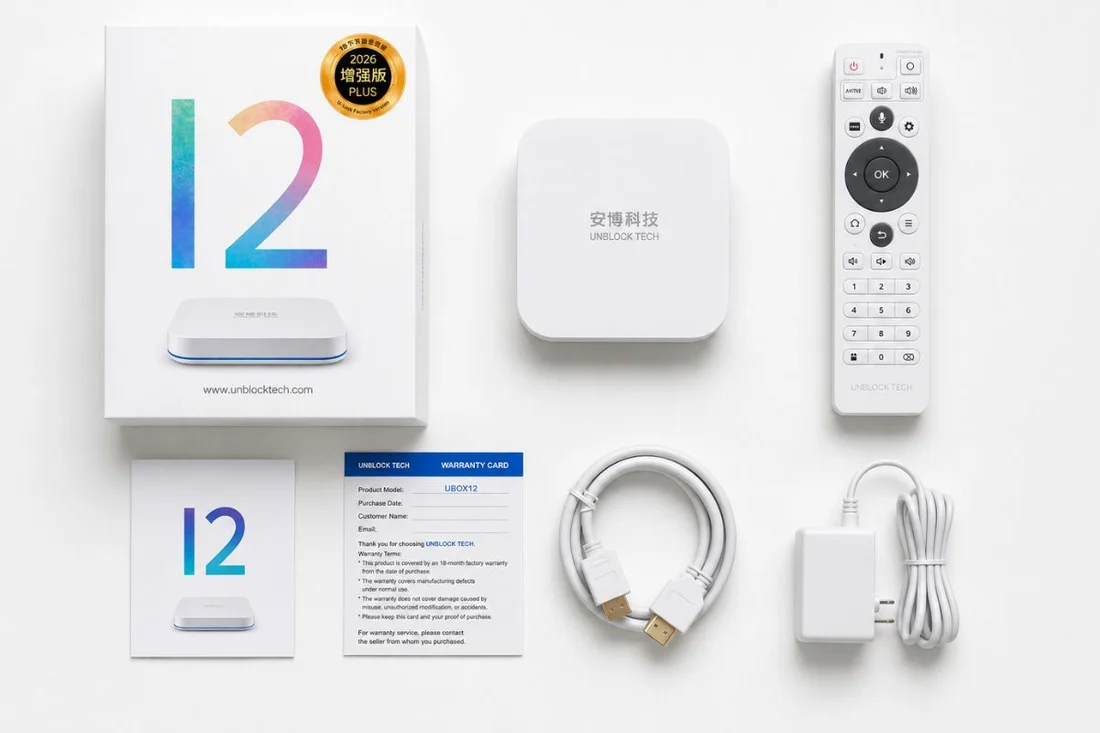
The latest model also includes a new exterior warranty identification mark.
This provides another visual reference when checking the product.
However, the exterior mark should not be used as the only proof of authenticity or warranty eligibility.
A product photo can be copied, reused, or modified online.
For this reason, we recommend using several verification points together.
The best way to verify a UBOX12 Pro purchase is to check:
1. Product model
Make sure the listing identifies the current UBOX12 Pro / Pro Max model.
2. Seller
Verify that you are purchasing from the official store or an authorized seller.
3. Warranty
Check whether the order is eligible for the current 18-month hardware warranty.
4. Product appearance
Compare the product and exterior warranty identification mark with the current official product images.
5. Order record
Keep your official order confirmation and order number.
How to Tell If You Are Buying the Latest UBOX12 Model
Before purchasing a UBOX12 TV Box online, we recommend going through this simple checklist.
Step 1: Check the Product Name
Look carefully at the complete product name.
The latest model may be displayed as:
UBOX12 Pro
or
UBOX12 Pro Max
Do not rely on the title alone.
Step 2: Check the Seller
This is especially important when shopping on Google, social media, or third-party marketplaces.
There may be multiple websites selling products using similar product names.
Always check the website domain and seller information before placing your order.
For official store purchases, visit:
UnblockTechTVBox Official Store
Step 3: Check the Warranty
Look for the warranty information before payment.
For eligible official-channel purchases, the current UBOX12 Pro warranty is 18 months of hardware coverage.
If another seller advertises a different warranty period, verify the seller's warranty policy before purchasing.
Step 4: Compare the Product Images
Compare the product photos with the current official listing.
Pay particular attention to:
➡️Device exterior➡️Model labeling
➡️Packaging
➡️Warranty identification mark
➡️Remote control
➡️Included accessories
Step 5: Save Your Order Information
After purchasing, keep your order confirmation.
We recommend saving:
Order Number + Product Name + Purchase Date + Customer Information
This information can help our support team locate your order quickly if you have a question about your UBOX12 Pro.
What Should You Check When Your UBOX12 Pro Arrives?
When your package arrives, we recommend doing a quick inspection before throwing away the packaging.
Check the following:
1. Model
Confirm that the delivered product matches the model shown on your order.
2. Packaging
Check the box for visible damage caused during transportation.
3. Accessories
Check that the included accessories are present.
4. Product condition
Look for any visible scratches, cracks, or other shipping damage.
5. Remote control
Make sure the remote control is included and functioning properly.
6. HDMI connection
Connect the UBOX12 Pro to your TV and confirm that the HDMI connection works normally.
7. Power
Turn on the device and complete the initial setup.
If you notice any issue, take clear photos or videos and contact customer support with your order number.
UBOX12 Pro Hardware: Don't Rely on Old Reviews
One common problem when researching TV boxes online is outdated information.
A UBOX12 review published months or years ago may describe:
➡️An earlier software version➡️An earlier warranty program
➡️An earlier product package
➡️An earlier product name
➡️An older accessory package
Therefore, when comparing UBOX12 vs UBOX12 Pro, don't assume that every specification shown in an old YouTube video or blog article still applies to the current model.
For the most accurate information, compare the specifications shown on the current official product page.
Why Should You Buy UBOX12 Pro From an Official Store?
When purchasing an electronic device such as a TV box, the product itself is only one part of the purchase.
After-sales support and warranty coverage can also be important.
Buying through an official or authorized sales channel allows you to keep a verifiable order record and makes it easier to confirm the applicable warranty terms.
This is especially useful if you need help with:
➡️Hardware issues➡️Product replacement
➡️Warranty questions
➡️Product verification
➡️Order information
➡️Accessories
A very low price on an unknown website may not provide the same warranty or after-sales support.
UBOX12 vs UBOX12 Pro: Frequently Asked Questions
Is UBOX12 Pro the latest UBOX12 model?
Yes. UBOX12 Pro / UBOX12 Pro Max is the current latest UBOX12 model offered through our official store.
Because different sellers may use shortened product names, always check the complete product information before ordering.
What is the main difference between UBOX12 and UBOX12 Pro?
The main purchase-verification differences covered in this guide are the updated model naming, exterior warranty identification mark, and warranty program.
The earlier UBOX12 warranty program provided 12 months of hardware coverage, while eligible official-channel purchases of the latest model receive 18 months of hardware warranty coverage.
For other hardware specifications, refer to the current official product listing rather than assuming that every specification has changed.
Is UBOX12 Pro Max the same as UBOX12 Pro?
The current official store may use UBOX12 Pro and UBOX12 Pro Max to refer to the latest UBOX12 model.
If you see different naming on another website, compare the actual product information, seller, packaging, warranty terms, and order details before purchasing.
Does every UBOX12 Pro sold online have an 18-month warranty?
No. Warranty coverage depends on the seller and applicable purchase terms.
If you want the current official-store warranty, confirm the warranty information before completing your order.
What should I do if I receive the wrong UBOX12 model?
Do not throw away the packaging.
Take clear photos of:
- ⬩➤The product
- ⬩➤Product label
- ⬩➤Packaging
- ⬩➤Model information
- ⬩➤Order confirmation
Then contact the seller and provide your order number so the product can be checked.
UBOX12 Pro Purchase Checklist
Before purchasing, use this simple checklist:
☑ Confirm the UBOX12 Pro / Pro Max model name
☑ Check the seller and website domain
☑ Confirm the 18-month hardware warranty for eligible official-channel orders
☑ Compare the latest product photos
☑ Check the exterior warranty identification mark
☑ Confirm the final order details before payment
☑ Save your order confirmation and order number
☑ Inspect the product after delivery
How to Identify the Latest UBOX12 Pro?
If you are searching for UBOX12 vs UBOX12 Pro, don't rely on the product name alone.
The safest way to identify the latest model is to compare several pieces of information together:
Model name + Official seller + Warranty + Exterior identification + Order record
The current model offered by our official store is the UBOX12 Pro / UBOX12 Pro Max, with an updated exterior warranty mark and 18-month hardware warranty coverage for eligible official-channel purchases.
For the most accurate and up-to-date information, always check the current official product listing before ordering.